Call or text Plona
Call or text (915) 285-0097.
Every call starts with: "Thanks for calling Plona. This call may be recorded and transcribed, and an automated assistant may help first."
When you text us, we reply only about what you asked. Reply STOP to stop texts, or HELP for help.
Read more in the Privacy Policy.
Email the team
Write to support@go-plona.com. Include your route or move number if you have one.
Ask Plona
Ask Plona is Plona's AI helper. It answers right away, on any page, and can pass your question to the team.
Your moves
Your routes, offers and moves are in Routes. If you are not logged in, Plona asks you to log in first.
How Plona works
Why Plona? explains how Plona works. Need someone to drive your car to another state? See how it works on Plona.
Plona gas card: questions and complaints
For a question or a complaint about your Plona gas card, a charge on it, a declined purchase, or how we handled a card problem, email support@go-plona.com with "Gas card" in the subject. You can also tap Report a problem with a charge on Your Plona gas card in the app. Tell us what happened, the date and the amount.
We confirm we got it within 2 business days and answer in writing within 15 business days. If we need longer, we tell you why and when to expect an answer. We keep a record of every complaint and what we did about it.
If you are not happy with our answer, reply to it and ask us to pass your complaint to Stripe, which runs the card program, and to the bank that issues the card. We will, and we tell you when we have. The bank and its terms are shown when you get the card and on Your Plona gas card in the app.
Fuel purchases only. The card works only during an active move, up to the amount shown for that move.
Text messages
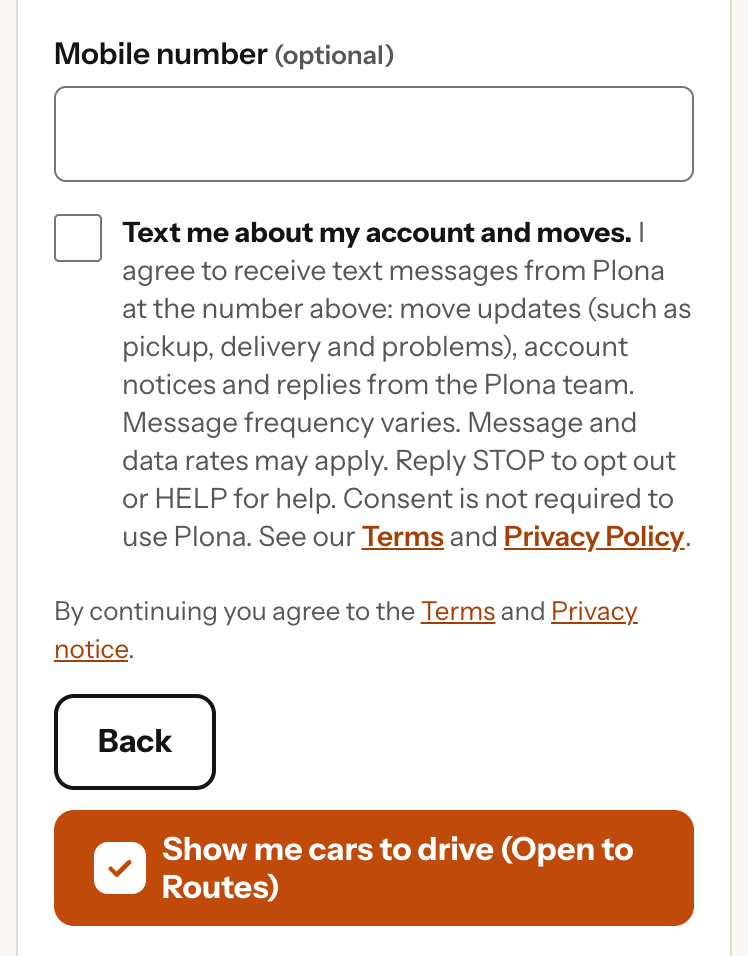
Plona texts are about your account and your moves, or come from a Plona team member replying to a request you posted. Reply HELP for help, or STOP to stop texts.
To get texts, check the box under Mobile number. It is on the Create your account page (sign up) and in Account Settings. It is never checked for you, and you do not need it to use Plona.
To turn texts on or off later, open More in the app, then Text messages.
Read more in the Terms of Use and the Privacy Policy.